
Model Railway Computer Control Centre
by Stephen and Mark Parascandolo
Introduction
Model Railway Computer Control Centre (MRCCC) is a Windows software application created to provide a user interface and interlocking for the model railway that closely replicates real modern UK signalling practice. MRCCC is designed to be the signalbox - it does not attempt to control the trains or allocate controllers and traction power feeds. However, it is a flexible system and complex additional logic can be built up if required using any of the signalling states, which MRCCC knows about.
The software is freeware and can be downloaded from this website free of charge. The source code (MS Visual Basic .NET 2003) is also available. MRCCC is not intended to be a commercial product and as such help and support are limited but I'll always try to help.
The software will only currently work with MERG RPC hardware running in RS232 mode. However the structure of the code is such that it would not take much additional work to code alternative hardware platforms or communications protocols. MRCCC looks and behaves like a real VDU based signalling control centre.
Some essential simplifications have been made - overlaps, approach locking and sectional route locking for example are not required for model railway use. Equally detail like point and signal identities are not required on the screen. The aim has been to recreate the appearance of a real system but without reliability, safety and availability features essential on the real railway.
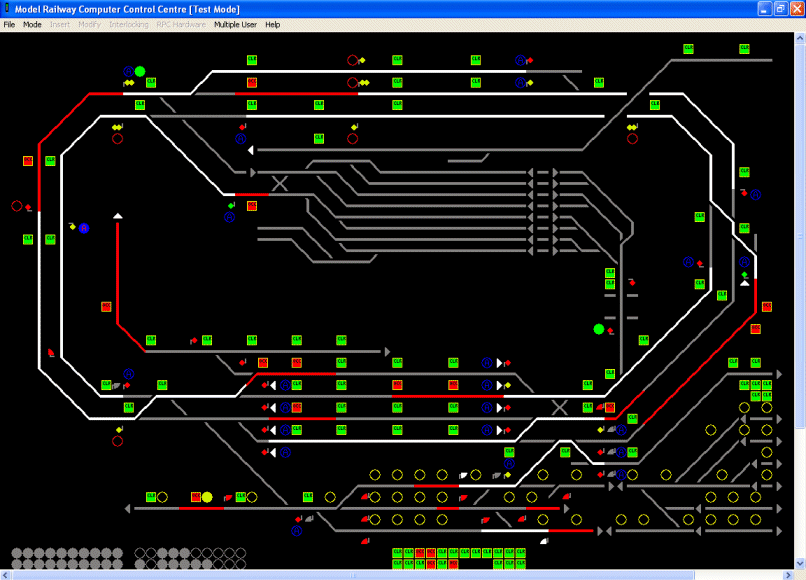
Screenshot of Model Railway Computer Control Centre Software
Features
- VDU control of Model Railway signalling on a PC.
- User Configurable screen layout and interlocking conditions. Configuration is via Windows dialog boxes, which should be understood with a little signalling knowledge, and not with any kind of scripting language requiring computing knowledge.
- Full and comprehensive validation of all user configured data with feedback at each stage on exactly why a layout is invalid or what is wrong with an entry just made.
- Test Mode provided for offline testing (without connecting the layouts) of the full interlocking including the ability to simulate user and layout inputs and monitor all states within the system.
- Entry-Exit (NX) route setting by mouse, calling all points as required.
- Auto Working buttons.
- Full automatic aspect sequencing for 2-, 3- and 4-aspect colour light signalling. (only basic sequencing provided, e.g. no flashing aspects)
- Point Keys.
- Call On/Shunt Exits buttons and position light aspects.
- Shunt Signals and permissive working.
- Facilities for slots or Emergency Replacement controls.
- Real time display of track occupation, aspect and point position (detection not provided).
- Train Operated Route Release (simplified).
- Route Release (simplified).
- Full interlocking of conflicting routes or occupied track circuits with comprehensive feedback to the signaller of why the interlocking has rejected a command.
- Multi-User support for large layouts.
- Automatic Requests for routes, mouse clicks or point keys based on RPC Inputs, or internal state changes.
Downloading and Installing
1. Use the Link to download the .NET Framework version 1.1* (20Mb download from Microsoft)
2. Use the Link to download the .NET Framework ver 1.1 Service Pack 1* (10Mb download from Microsoft)
3. Download the MRCCC Installer (1Mb download)
4. Run the MRCCC Setup application
* If required (will also run with .NET framework ver 2.0)
This will result in a Model Railway folder on the Start Menu containing the MRCCC Application, the MRCCC Client, and the three technical bulletins covering the software and the Horton application.
The default directory is \Program Files\MRCCC and a \samples sub folder will contain the Horton Layout, and a simple Examples Layout that may be useful to learn from and experiment with.
System Requirements
MRCCC is built using Visual Basic .NET which requires the .NET framework to run. Microsoft recommends the following for the framework (I have used slightly less): -
- 133MHz Intel Pentium or AMD Opertron, Athlon64 or better
- 128Mb RAM " 150Mb Hard Disk space (including 40Mb during installation only)
- 800 x 600 resolution, 256 colour graphics
- Mouse or compatible pointing device
- MS Windows XP, 2000 SP 4, ME, 98, NT4: SP 6a or Server 2003 operating system
Experience has shown that the MRCCC application works best on a faster PC (2GHz or above with 256Mb RAM) especially when a large layout is being operated at speed. Slower PCs, providing they can handle the .NET framework are more than adequate for data preparation or use as MRCCC Clients.
The software supports up to 1280x1024 resolution layouts. It is easier to run layouts which fit wholly on the screen without having to scroll.
Technical Bulletins
TB G16/85 - MRCCC Product Overview
TB G16/81 - RPC Application on Horton
TB G16/87 - Computer Assisted Cab Control (CACC)
Project Report - MRCCC started life as a Brunel University Final Year Project and has been developed further since. This is the Final Year Project Report that accompanies the software with a thorough explanation of Design Process.
Slides from presentation to MERG Nov 2005
Source Code
Release 2 Source Code VB.NET 20/11/05
Release 1 Source Code VB.NET 30/5/05
Please contact me if you intend to modify the code. You may find that I can offer support, and/or advise. In any case, I would like to know what development work may be going on.
Release History
30/5/05 - Release 1 (MRCCC ver 3.3b, MRCCC Client ver 1.0)
20/11/05 - Release 2 (MRCCC ver 4.1, MRCCC Client ver 1.0)
- Read Release Notes if upgrading
and for details of changes.
RPC documents
The RPC system was designed by Gordon Hopkins of MERG. It uses a simple serial system to connect inputs and outputs. For kits, the latest information and copies of documents for RPC modules join MERG and order the kits from Gordon Hopkins.
RPC PC Interface Specification
RPI PIC PC Remote Panel Interface
RPI RSE Remote Stack Extension System
RPI FTC 8 Floating Track Circuits
SD4 Multiple Aspect Signal Driver
PMR1 Solenoid Point Motor/Relay Driver
Links
Model Electronic Railway Group
Railway
Technical Webpages - Railway Signalling
No responsibility can be taken for the contents of external
links.
 The Late Stephen
Parascandolo
The Late Stephen
Parascandolo
© S.J.Parascandolo. This website is my personal website, produced as a hobby and by me as an individual. Any views, opinions and information on this website are my own, and not those of my employer, or any other individual, company, or organisation unless explicitly stated otherwise. All signalling elements of the MRCCC software have been designed and coded by myself using publicly available information on prototype operation.