
About | Plan | Pictures | Construction | Scenery | Signalling and Control | Layout Team | Exhibitions
Introduction | RPC Hardware | MRCCC Software | Signalling Plan | Wiring Diagrams
Model Railway Computer Control Centre
Introduction
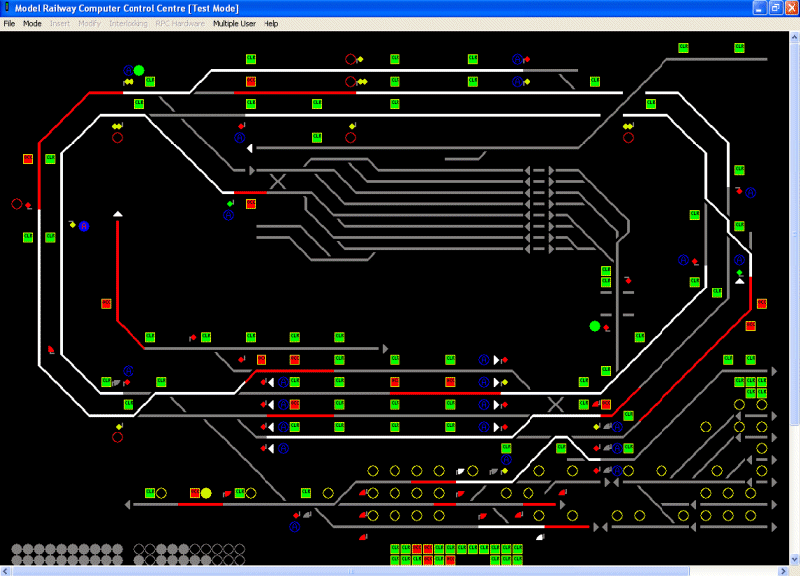
The signalling and interlocking on Horton is performed using the Model Railway Computer Control Centre software. MRCCC was developed by member, Stephen Parascandolo specifically for the needs of Horton, but it is fully data configurable to any layout.
The Software is available through the MRCCC website.
Software
Model Railway Computer Control Centre (MRCCC) is a Windows software application created to provide a user interface and interlocking for the model railway that closely replicates real modern UK signalling practice. MRCCC is designed to be the signalbox - it does not attempt to control the trains or allocate controllers and traction power feeds. However, it is a flexible system and complex additional logic can be built up if required using any of the signalling states, which MRCCC knows about.
The software is freeware and can be downloaded from this website free of charge. The source code (MS Visual Basic .NET 2003) is also available. MRCCC is not intended to be a commercial product and as such help and support are limited but I'll always try to help.
The software will only currently work with MERG RPC hardware running in RS232 mode. However the structure of the code is such that it would not take much additional work to code alternative hardware platforms or communications protocols. MRCCC looks and behaves like a real VDU based signalling control centre.
Some essential simplifications have been made - overlaps, approach locking and sectional route locking for example are not required for model railway use. Equally detail like point and signal identities are not required on the screen. The aim has been to recreate the appearance of a real system but without reliability, safety and availability features essential on the real railway.
Features
- VDU control of Model Railway signalling on a PC.
- User Configurable screen layout and interlocking conditions. Configuration is via Windows dialog boxes, which should be understood with a little signalling knowledge, and not with any kind of scripting language requiring computing knowledge.
- Full and comprehensive validation of all user configured data with feedback at each stage on exactly why a layout is invalid or what is wrong with an entry just made.
- Test Mode provided for offline testing (without connecting the layouts) of the full interlocking including the ability to simulate user and layout inputs and monitor all states within the system.
- Entry-Exit (NX) route setting by mouse, calling all points as required.
- Auto Working buttons.
- Full automatic aspect sequencing for 2-, 3- and 4-aspect colour light signalling. (only basic sequencing provided, e.g. no flashing aspects)
- Point Keys.
- Call On/Shunt Exits buttons and position light aspects.
- Shunt Signals and permissive working.
- Facilities for slots or Emergency Replacement controls.
- Real time display of track occupation, aspect and point position (detection not provided).
- Train Operated Route Release (simplified).
- Route Release (simplified).
- Full interlocking of conflicting routes or occupied track circuits with comprehensive feedback to the signaller of why the interlocking has rejected a command.
- Multi-User support for large layouts.
- Automatic Requests for routes, mouse clicks or point keys based on RPC Inputs, or internal state changes.